Compare
PuTTY alternative: a more modern way to use SSH
Looking for a PuTTY alternative? Where PuTTY falls short for daily server work, what GoTerm does instead, and how to move your keys and hosts.
Published · Updated
PuTTY has been the first SSH client on Windows PCs since the late 1990s. It is free, it is small, and it works. If you look after servers, you have almost certainly used it, and it may still be pinned to your taskbar.
So if you are looking for an alternative to PuTTY, it is rarely because PuTTY is broken. It is because the way you work has changed. We make GoTerm, so we aren’t neutral, but we have tried to be fair. This article says where PuTTY is still the better tool, and every claim about PuTTY links to its own documentation at the end.

What PuTTY does well
- It costs nothing. PuTTY is open source under the MIT licence. There is no account and nothing to sign up for.
- It is small and quick. One
putty.exeruns without an installer and opens at once. - It speaks more than SSH. Telnet, Rlogin, SUPDUP and local serial lines too. If you set up switches through a console cable, PuTTY is still a good choice.
- It is careful about security. When a flaw is found, the team says plainly who is affected and what to do, as they did for the P-521 key problem in 2024.
Where it starts to pinch
PuTTY was made for one person, on one Windows PC, with one window per server. Most server work doesn’t look like that any more. These are the places you feel it.
Close the window and the work stops
In PuTTY the SSH connection lives inside the window. Close it, let the laptop sleep or lose the Wi-Fi, and the connection ends. Windows reports it as Network error: Software caused connection abort, and whatever you were running in that shell usually stops with it.
The old answer is to start tmux or screen before anything long. It works, as long as you remember to.
Your hosts live in one PC’s registry
Saved sessions are kept in the Windows registry, under HKEY_CURRENT_USER\Software\SimonTatham\PuTTY\Sessions. They belong to one user on one PC. A new laptop, a second machine or a new colleague means exporting registry keys and fixing the paths to your key files by hand.
Files need a second program
PuTTY comes with PSCP and PSFTP for copying files, and both are command line tools. Most people install WinSCP or FileZilla next to it so they can drag a file across. That is a second app with its own list of servers to keep in step.
One window per server, and nobody else sees it
PuTTY has no tabs and no split screen: each server is a window of its own. When a colleague asks you to look at something, you share your whole screen on a call and read the output out to each other.
Keys are files on each person’s disk
PuTTY keeps keys in its own .ppk format, made with PuTTYgen and loaded into Pageant. Everyone keeps their key files on their own PC. On a team, that makes it hard to know who holds which key, and hard to take one back when someone leaves.
Updates are up to you
PuTTY doesn’t update itself. In April 2024 a flaw was found in how versions 0.68 to 0.80 signed with NIST P-521 keys (CVE-2024-31497). Anyone who had used such a key with those versions was told to revoke it and make a new one. The fix came out quickly, but each copy still had to be updated by whoever installed it.
GoTerm as a PuTTY alternative
GoTerm is an SSH and SFTP terminal that runs in your browser, with a desktop app for Windows. The biggest difference is where the session lives: on GoTerm’s gateway, not in your window. Here is the same day of work, done there.
Sessions that wait for you
Start a long job, close the laptop and go home. The session keeps running on the gateway. Later, on any device, find it under Sessions in the sidebar and choose Attach. GoTerm shows again what the terminal printed while you were away, up to a limit.
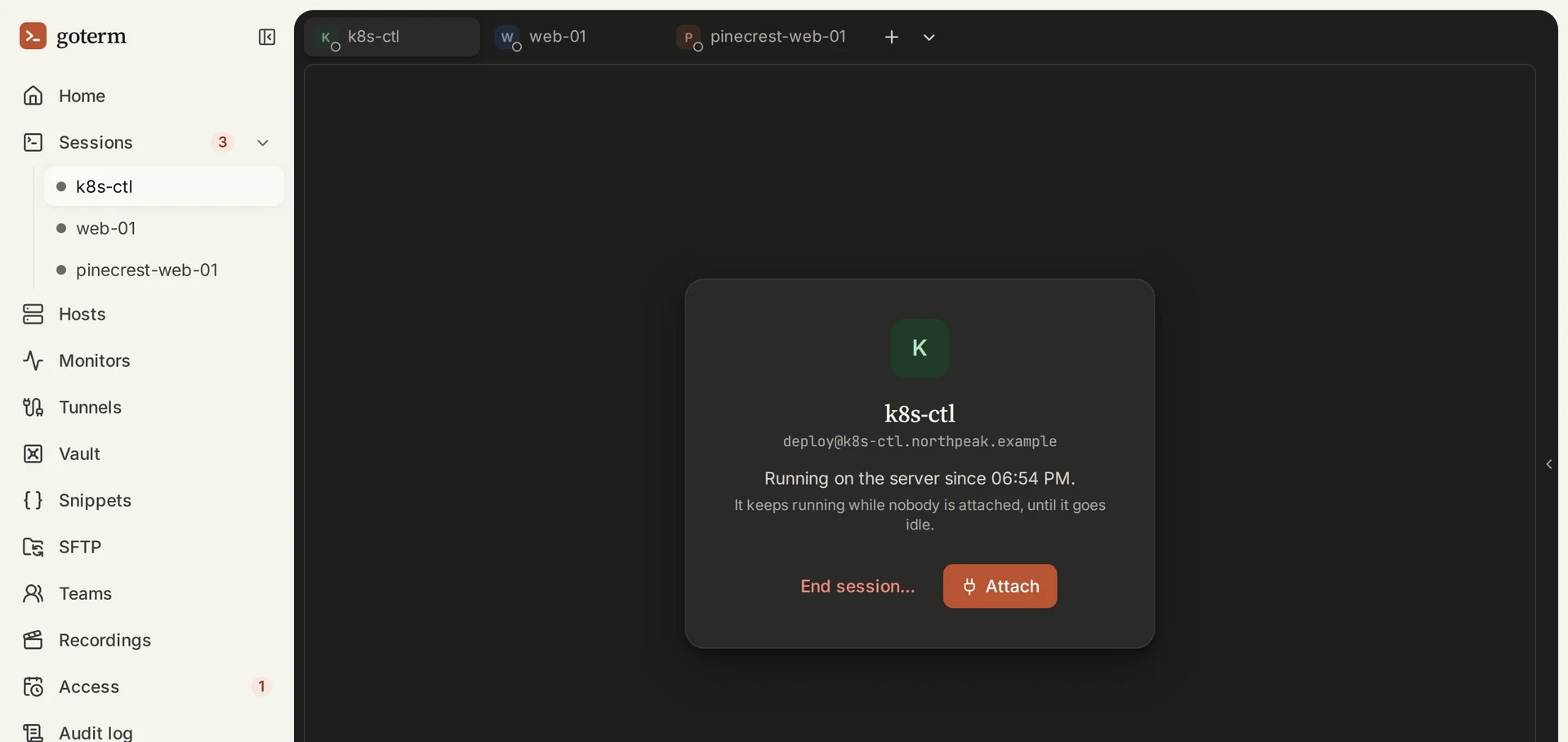
There is no tmux to remember. A session that nobody is attached to ends after your workspace’s idle limit, so forgotten sessions don’t pile up.
Hosts in one place, on every device
Hosts live in your workspace, not in a registry. Sign in on a new laptop and they are already there. On a team, hosts sit in groups the whole team shares, each with its jump host if it needs one.
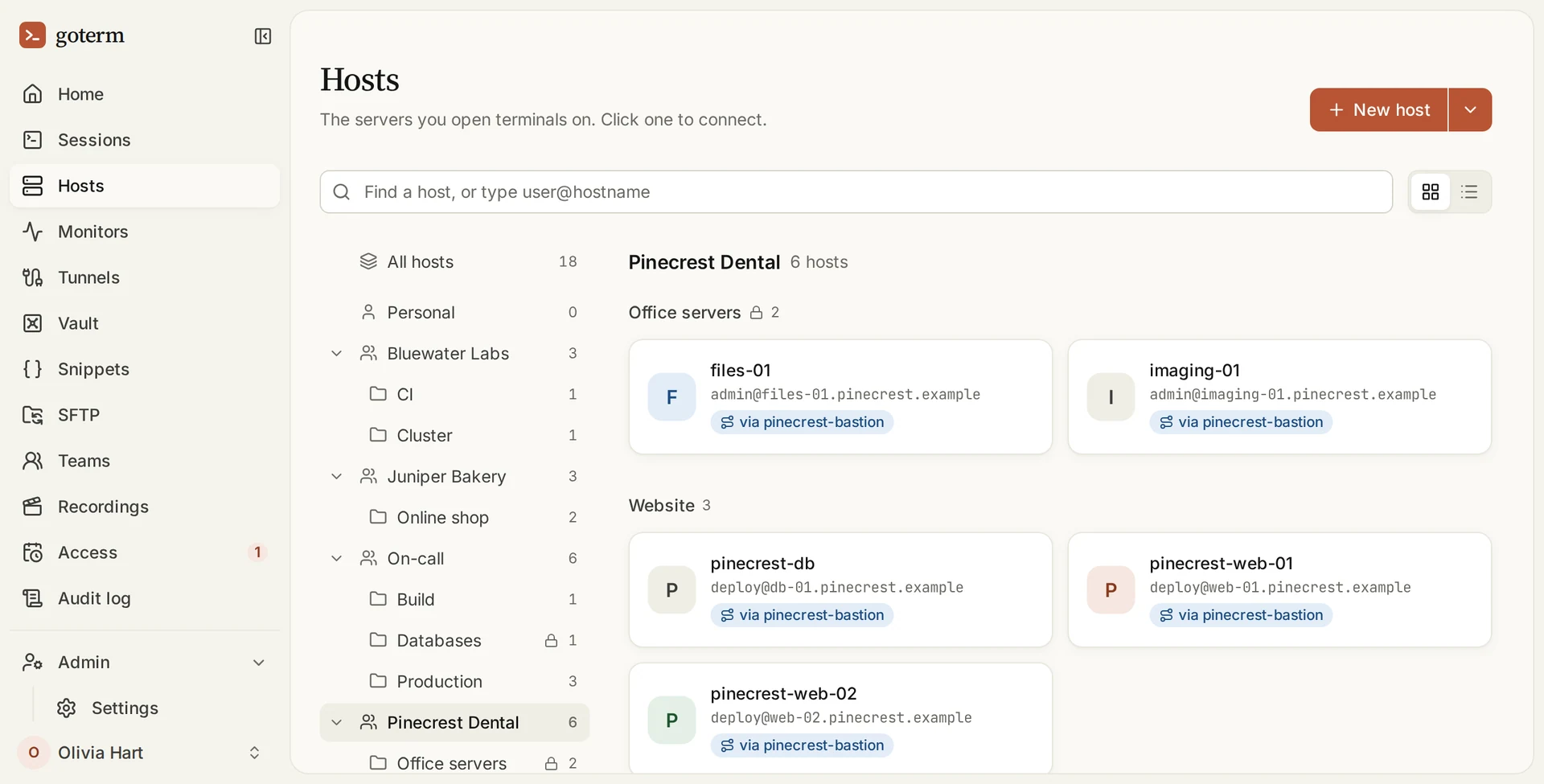
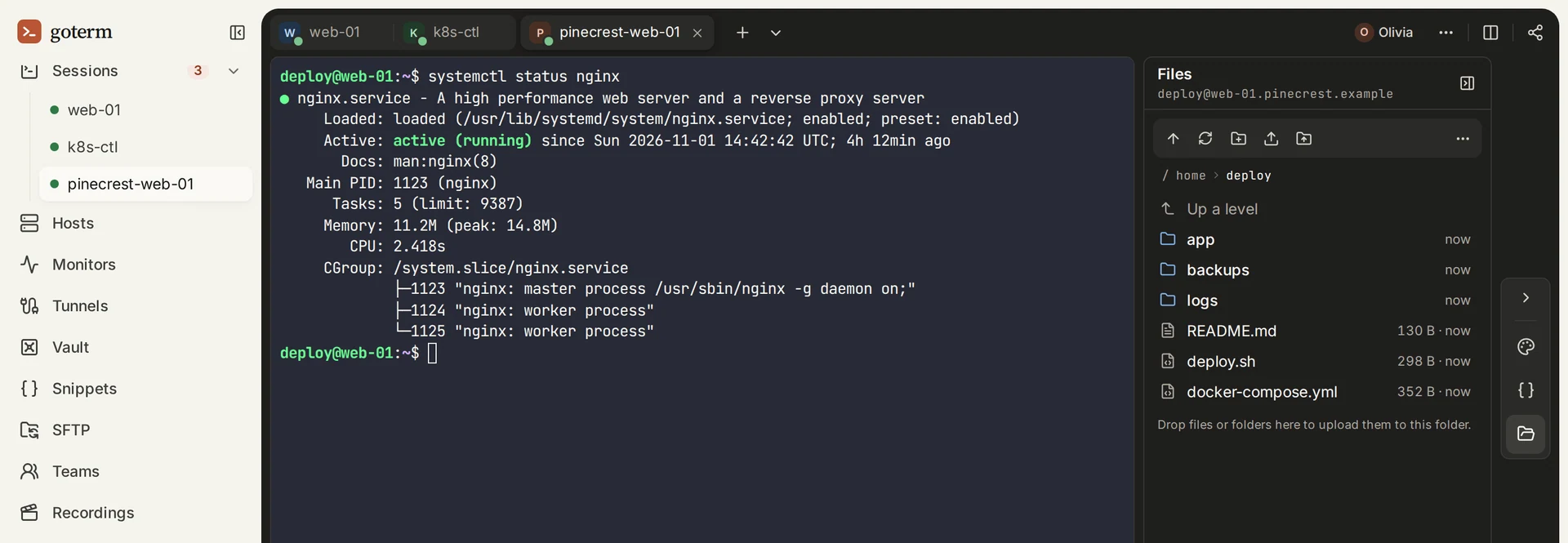
Files beside the terminal
Choose Files in a session and the host’s folders open next to the terminal, over SFTP. Drop files onto the panel to upload them, and use a row’s download button to fetch one. A folder comes down as a .zip. There is no second app and no second list of servers.
Help without sharing your screen
Choose Share in a session and invite a teammate by email. They see the same terminal, live, in their own browser. Tick can type to let them type, or leave it off and they watch. The gateway drops a watcher’s keystrokes, so view only means view only. You can also make a view-only link that expires.
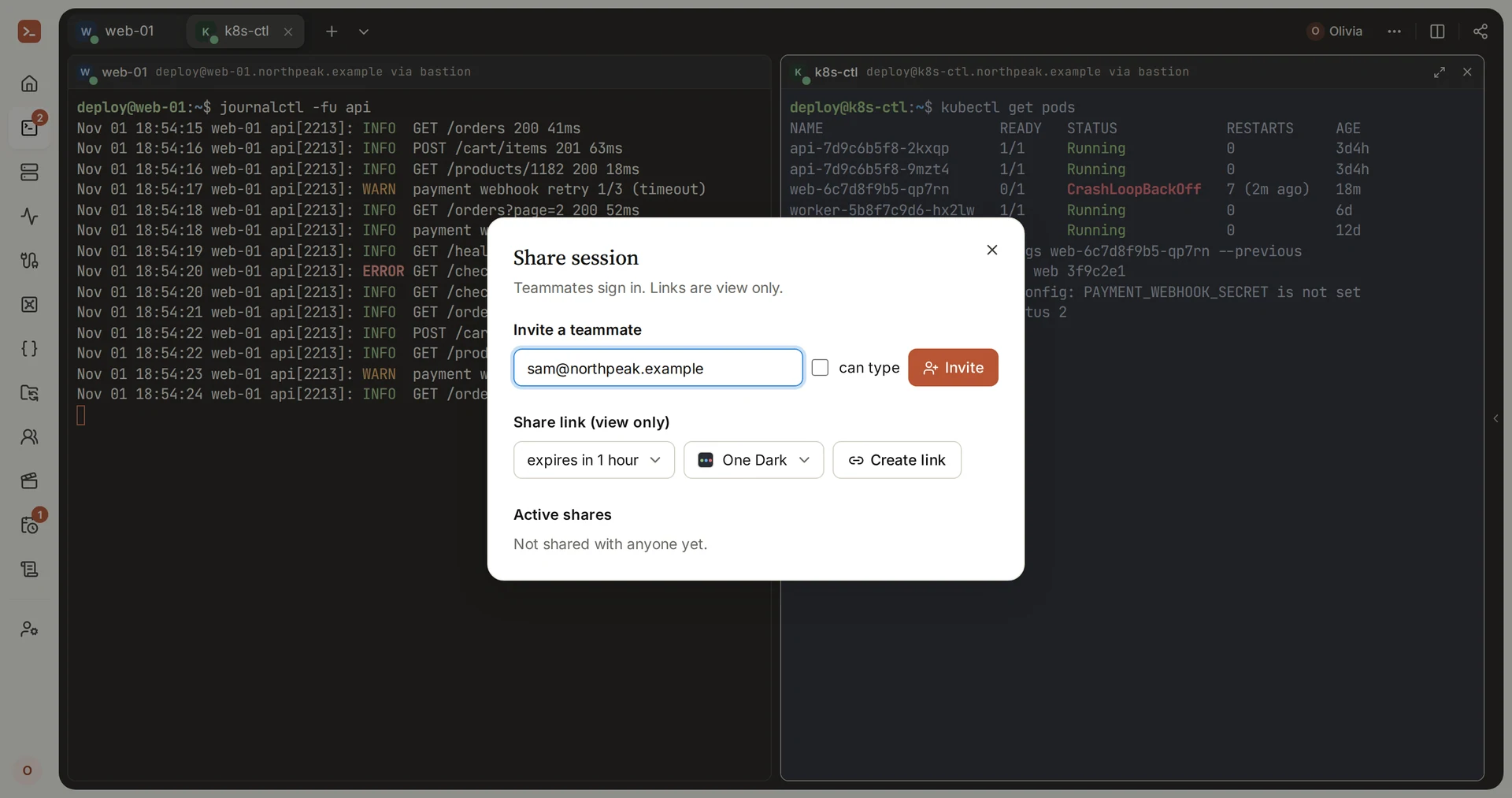
Sessions also open in tabs, and Split the screen puts two side by side, so a log and a shell fit in one window.
Keys you can use without holding them
Keys go into the Vault once, sealed, and each host that needs one points at it. A team’s members connect with the team’s keys but never see them. When someone leaves, you remove their access to GoTerm, and there is no copy of the key on their laptop to worry about.
| PuTTY | GoTerm | |
|---|---|---|
| Price | Free and open source | A free desktop app. The web terminal from $6 a month |
| Where it runs | Windows. Unix systems from source | Any modern browser, a phone’s browser, and a desktop app for Windows |
| Account | None | None for the free desktop app. A workspace for the web |
| Saved hosts | The Windows registry, on one PC | Your workspace, on every device, shared with your team |
| Close the window | The session ends | The session keeps running |
| Tabs and split screen | No. One window per session | Tabs, and split panes |
| Copying files | PSCP and PSFTP, on the command line | A Files panel beside the terminal, over SFTP |
| Showing a colleague | Share your screen on a call | Share the session, view only or with typing (Teams) |
| Keys | .ppk files on each PC, loaded into Pageant | Sealed in the Vault. Team members use keys without seeing them |
| A record of the work | Your own log file, if you turn it on | An audit log, and session recording on Teams |
| Telnet, serial, Rlogin | Yes | No. SSH and SFTP only |
The free desktop app connects straight from your computer, as PuTTY does. Sessions that keep running, the Vault and the web terminal start with Personal.
Moving from PuTTY to GoTerm
You can move over in an afternoon. GoTerm reads keys in the OpenSSH format, not .ppk, so the keys come first.
Convert your keys
- Open PuTTYgen and choose Load. Pick your
.ppkfile and type its passphrase. - Open the Conversions menu and choose Export OpenSSH key. Save the file somewhere only you can read.
- In GoTerm, open Vault, choose New key, then Import mine. Paste the key or pick the file, type its passphrase, and save it.
- Delete the exported file once the key is in the Vault.
List your saved sessions
PuTTY keeps each saved session’s address, port and user name in the registry. This PowerShell command lists them all:
Get-ChildItem HKCU:\Software\SimonTatham\PuTTY\Sessions |
  Get-ItemProperty |
  Select-Object PSChildName, HostName, PortNumber, UserName
A space in a name shows as %20, the way PuTTY stores it. Default%20Settings is PuTTY’s own defaults, not a server.
Add the hosts
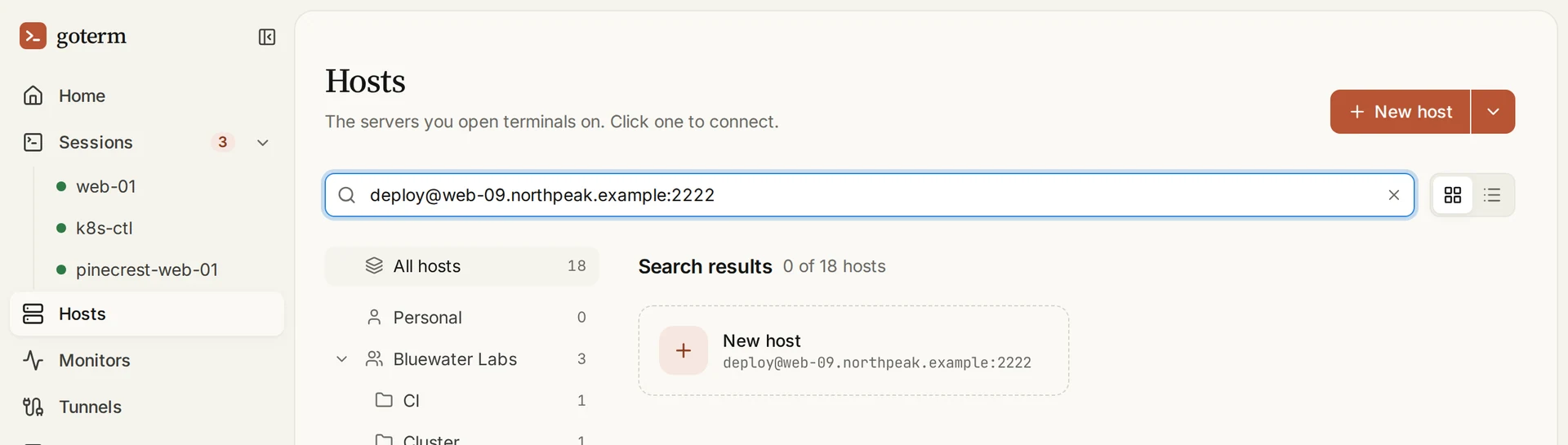
- On Hosts, type a session into the search the way you would for ssh, such as
deploy@web-01.example:22. A wholessh -p 2222 deploy@web-01.examplecommand works too. - Choose the New host card. The form opens filled in.
- Under Auth method pick Private key, then your key under Saved key, and choose Save.
- If you reached the server through a jump host, pick it under Connect through.
Check each server’s host key
Like PuTTY, GoTerm remembers a server’s host key the first time it connects, and refuses to connect if the key changes. You find each key’s SHA256 fingerprint under Vault, then Known hosts. To be sure it is the right server, compare it with what the server itself reports, over a connection you already trust:
for key in /etc/ssh/ssh_host_*_key.pub; do
  ssh-keygen -lf "$key"
done
When to keep PuTTY
No PuTTY alternative is right for every job, and plenty of people keep both. PuTTY is still the better tool when:
- you connect over a serial cable or Telnet, to switches, routers and other gear without SSH;
- you work alone on one PC, your sessions are short, and nothing needs to outlive the window.
GoTerm earns its place when sessions must outlive a window, when more than one person works on the same servers, or when you work from more than one device.
Try it
The desktop app is free and needs no account. The web terminal comes with Personal and Teams, each with a 7-day free trial and no card. Or open the demo: a workspace of your own for an hour, on servers made for it.
Bringing a team across? The Getting started guide walks through a first workspace.
Sources
- PuTTY’s download page: the 0.85 release, its programs and the systems it runs on.
- PuTTY’s licence: the MIT licence.
- PuTTY manual, chapter 1: the protocols it speaks.
- PuTTY manual, chapter 3: connecting to a local serial line.
- PuTTY manual, chapter 4: where saved sessions are stored.
- PuTTY manual, chapter 8: PuTTYgen, and exporting a key in the OpenSSH format.
- PuTTY manual, chapter 10: what “Software caused connection abort” means.
- PuTTY’s note on CVE-2024-31497: the P-521 key flaw, and what to do about it.
